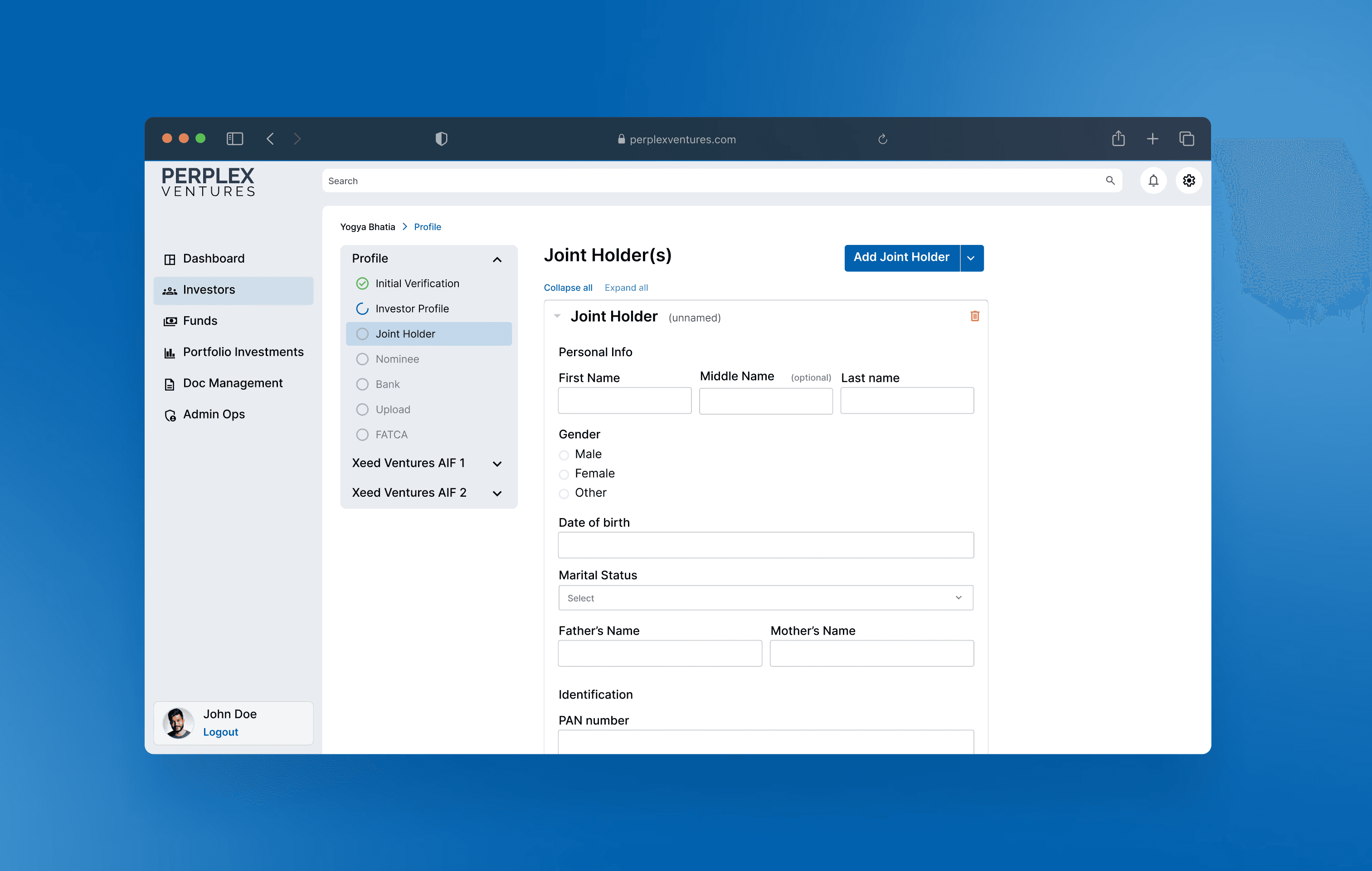
FinTech SAAS Platform
Building design foundations for a pre-launch fintech product
I joined an Alternative Investment Fund (AIF) platform team as the sole designer, three months before its pilot launch. My role was to transform a functional but fragmented admin interface into a cohesive, scalable experience. Over 3 months, I conducted systematic usability analysis, built a comprehensive design system from scratch, and designed 50+ screens (including modals, multi-step forms, and various state scenarios) for fund managers and investors while establishing design foundations that accelerated future development.
Duration
3 months
Role
UX/UI Designer
Tools
Figma, FigJam
SKILLS
Design Systems, Problem Solving, Developer Handoff
PROBLEM
Functional platform lacking design cohesion and user-centered thinking
When I joined, I faced two interconnected challenges: understanding a complex financial product while simultaneously redesigning its interface. I had no background in AIF and needed to quickly grasp unfamiliar terminology, user types, and regulatory requirements.
The team had built a working platform focused on getting functionality operational. As they prepared for pilot launch, they brought me on to identify usability issues and transform the experience before users encountered it—with one major challenge: I had zero background in Alternative Investment Funds.
MY MAIN TASK
Learn the domain quickly, uncover potential usability problems through systematic analysis, and build scalable design foundations for rapid feature development.
The admin portal had 12 main pages with multi-step forms (4-8 steps each), numerous dialog boxes, and various interaction states. The interface lacked consistency in visual language, interaction patterns, and information hierarchy. Without a design system, each screen followed different rules for spacing, typography, and component behavior. Launching with this interface would risk losing pilot customers' trust in a market where credibility is everything.
Learning phase
Immersing myself in financial terminology and user workflows
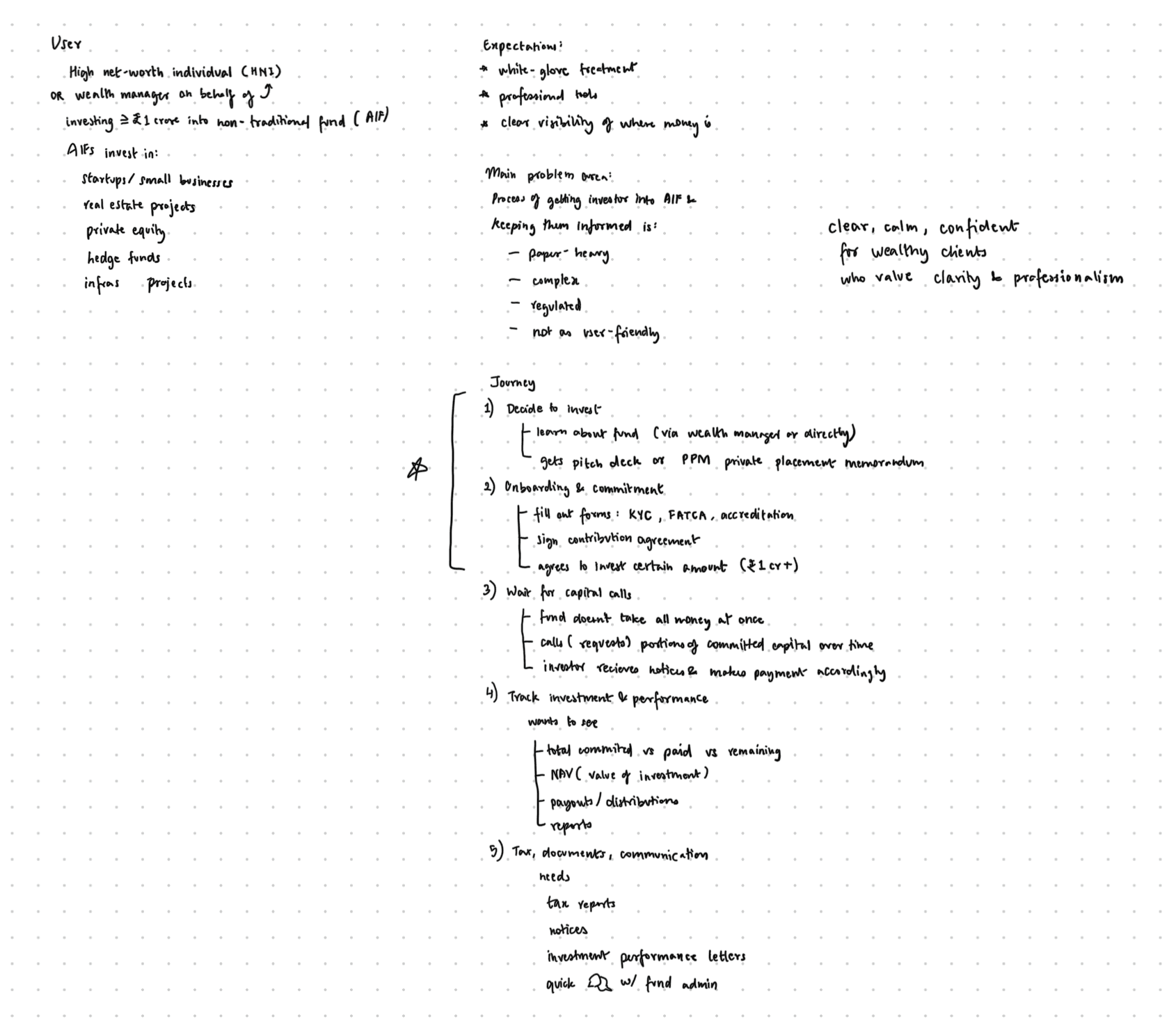
Before I could analyze the interface, I needed to understand what I was looking at. I spent my first week researching AIF, studying the existing platform, and mapping out user journeys.
I researched AIF basics, investment types, regulatory requirements, and the Indian financial landscape. I studied competitors both in India and internationally to understand industry standards and user expectations for investment platforms.
I systematically went through every screen of the existing platform, documenting terminology I didn't understand. Each unfamiliar term became a research task. I needed to know not just what words meant, but why they mattered to fund managers and how they fit into larger workflows.
I mapped out priority task flows for each user type. What would fund managers need to accomplish daily? What information was critical for decision-making? How did different portals connect? Understanding these flows helped me grasp where design inconsistencies would cause the most friction.
This learning phase was crucial. I couldn't evaluate usability without understanding what users were trying to accomplish and what information they needed at each step. With this foundation, I was ready to systematically evaluate the interface.
Discovery & Analysis
Systematic heuristic evaluation uncovered 50+ usability issues
With domain knowledge established, I began a comprehensive usability audit using Jakob Nielsen's 10 usability heuristics. I conducted an in-depth analysis of all 12 admin portal screen flows, documenting every violation I found.
My process
I took screenshots of each page and used color-coding to mark violations by heuristic category. For each issue, I documented what the problem was and which usability principle it violated. I used online accessibility contrast tools and various Figma plugins to evaluate visibility and readability objectively, not just relying on my perception.
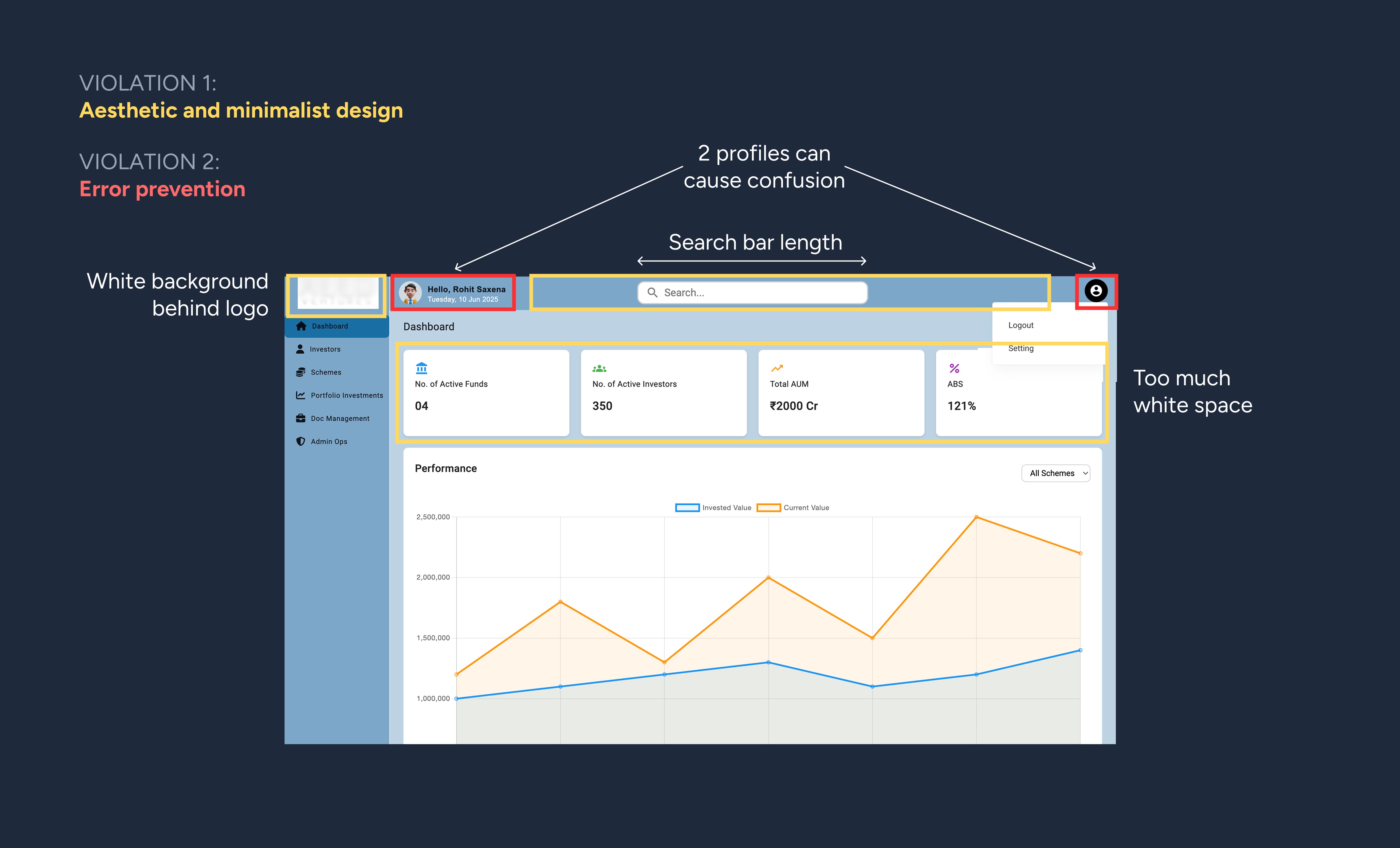
My findings
The analysis revealed patterns beyond surface-level inconsistencies. I documented 50+ issues across high, medium, and low severity levels:
15+ high-priority issues that would block core task completion (broken navigation, non-functional filters, unclear user context)
20+ medium-priority issues around alignment, unclear icon meanings, and visual hierarchy
15+ low-priority issues involving color contrast, tooltips, and minor refinements
The root problem was clear: the interface had evolved around getting functionality working rather than supporting user decision-making in financial contexts. There was no unified design language, no consistent interaction patterns, and no clear information hierarchy.
This systematic documentation became the foundation for all prioritization discussions with stakeholders—giving us an objective framework for deciding what to fix first.
Collaboration
Presenting findings and aligning on design strategy
I compiled my analysis into a comprehensive presentation and shared it with the team. They were impressed by the level of detail and agreed with the problems I'd identified. Some issues they had already recognized but deprioritized due to time constraints.
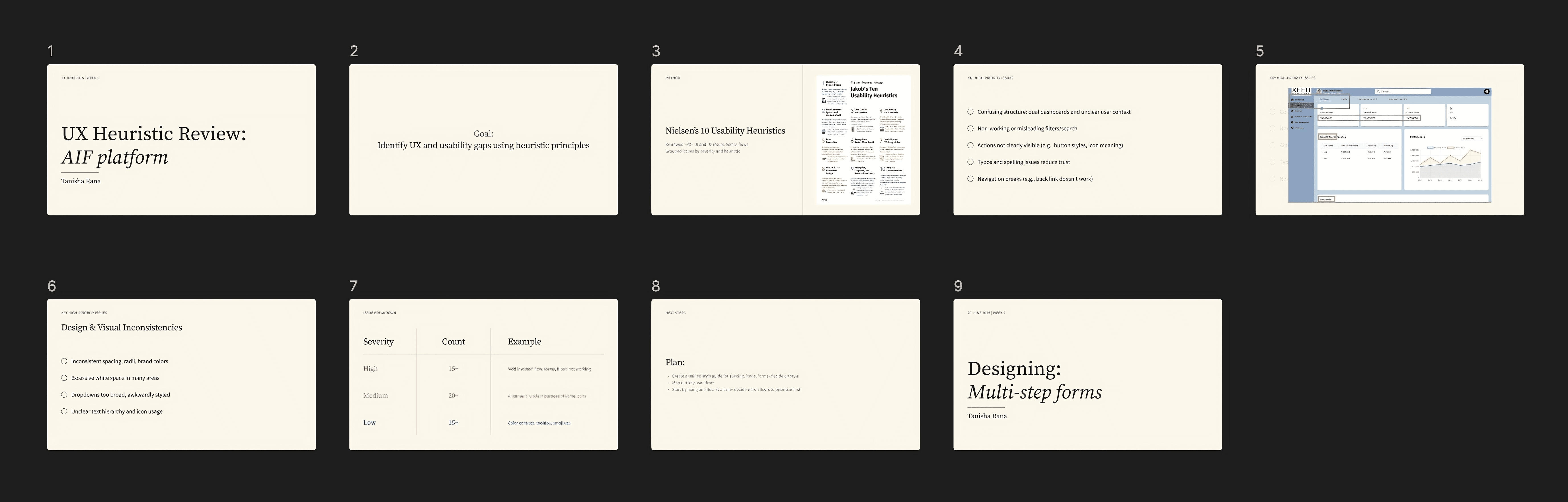
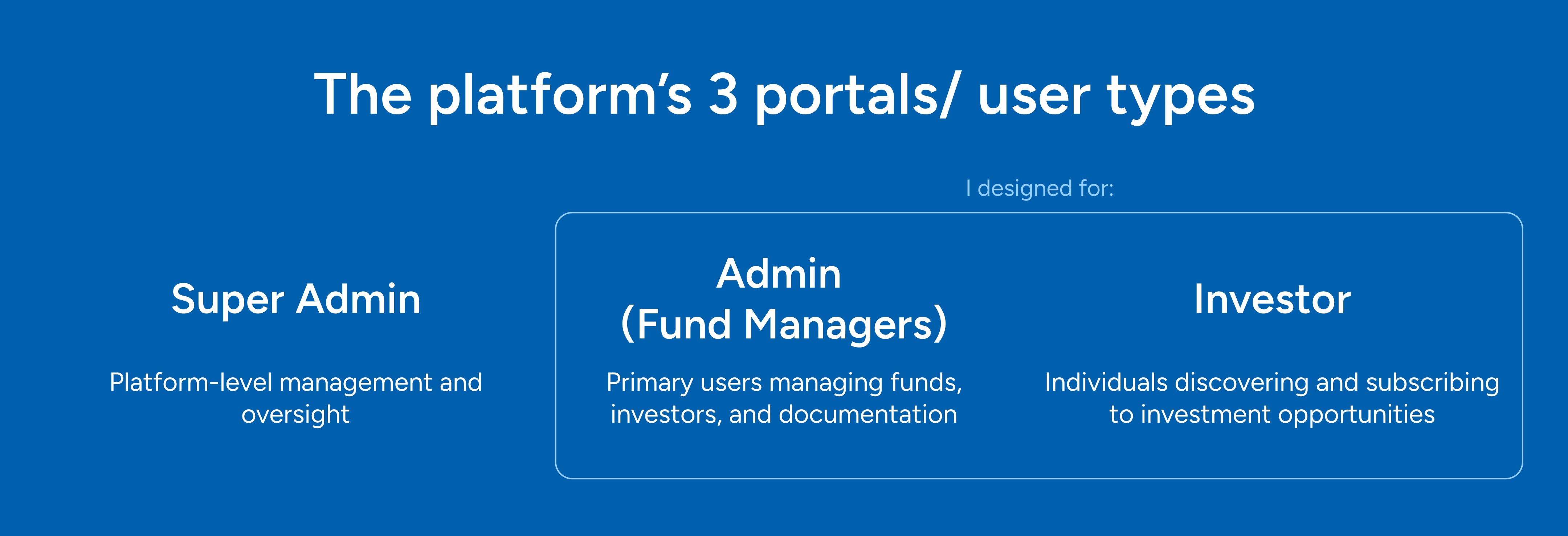
Strategic Discussion: After my presentation, the team walked me through all three portals (super admin, admin, and investor) to ensure I understood every page, action, and user flow. I had requested this walkthrough because I needed to see how they envisioned the platform working, not just how it currently looked.
A few days later, they shared a detailed document listing what needed to be designed. This became my roadmap, organized into foundational elements I needed to establish:
Button specifications (sizes, colors, icons, states)
Typography system for headers and body text
Navigation active states
Input elements (text fields, dropdowns, labels)
Spacing and layout standards
Color scheme finalization
Icons for all navigation nodes
Progress indicators and status colors
Modal and toast message styles
...and 6 more foundational design decisions
We prioritized this list together based on what would unblock the most work. Typography and button systems came first because they appeared everywhere. Complex components like progress trackers and document management could come later. Set with clear priorities, I began building the design system.
Foundation building
Starting with core design system elements
I couldn't design individual screens until I established the rules all screens would follow. I started with the most foundational elements that appeared everywhere and would unblock the most development work.

Typography System
Complex financial data needed clear hierarchy— users scanning investment details shouldn't have to guess what's important. I established a hierarchy for all text elements: page headers, section subheaders, body text, labels, and micro-copy. I defined font sizes, weights, line heights, and colors for each level, ensuring critical information always stood out while maintaining scannability.
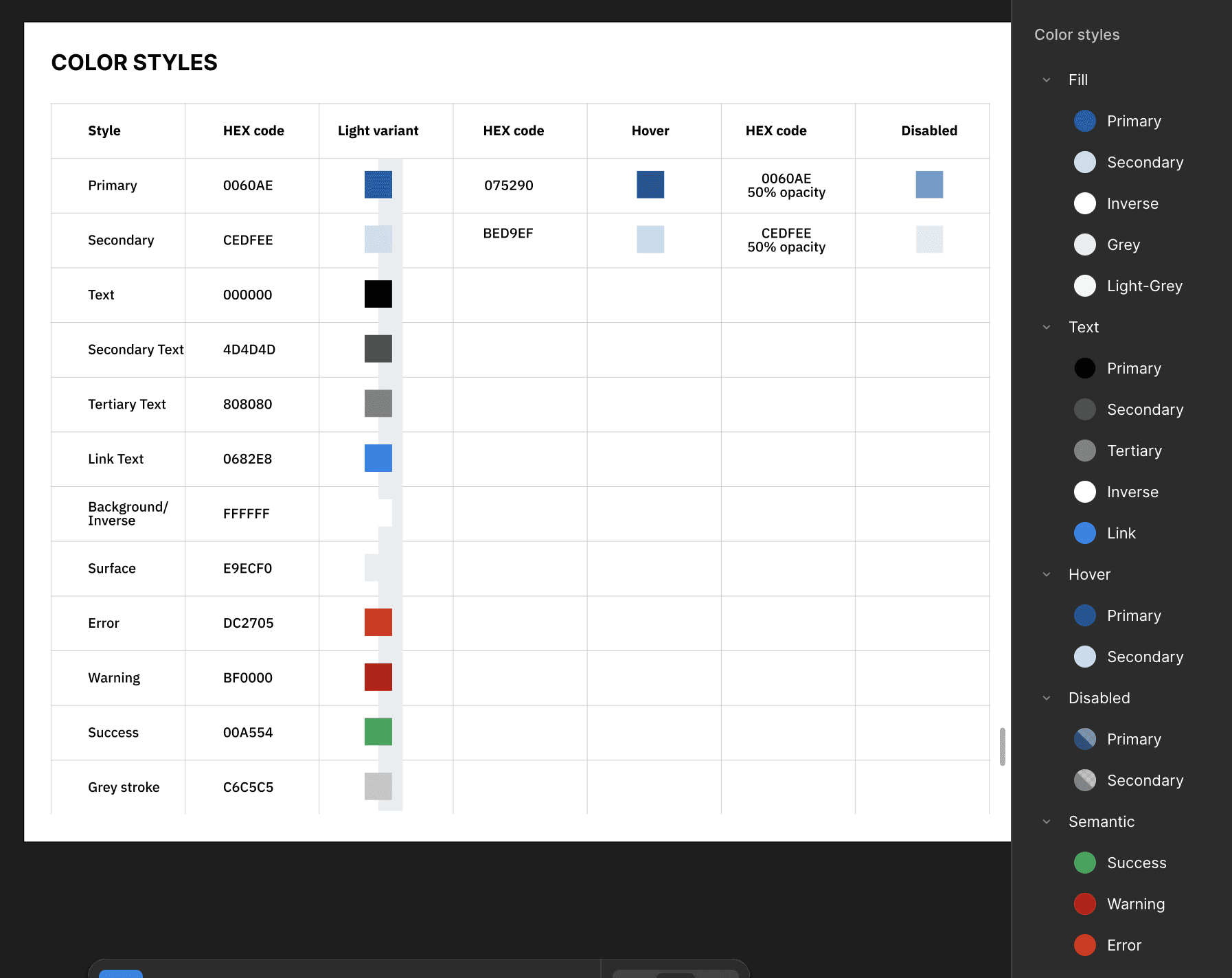
Color Palette
I finalized the color scheme for primary backgrounds, the sidebar, headers, interactive elements, and status indicators. Each color needed a clear purpose and sufficient contrast ratios for accessibility. I also defined color states for different workflow stages: not started, in progress, and completed. This foundation meant developers could build interfaces without constantly asking "what color should this be?"
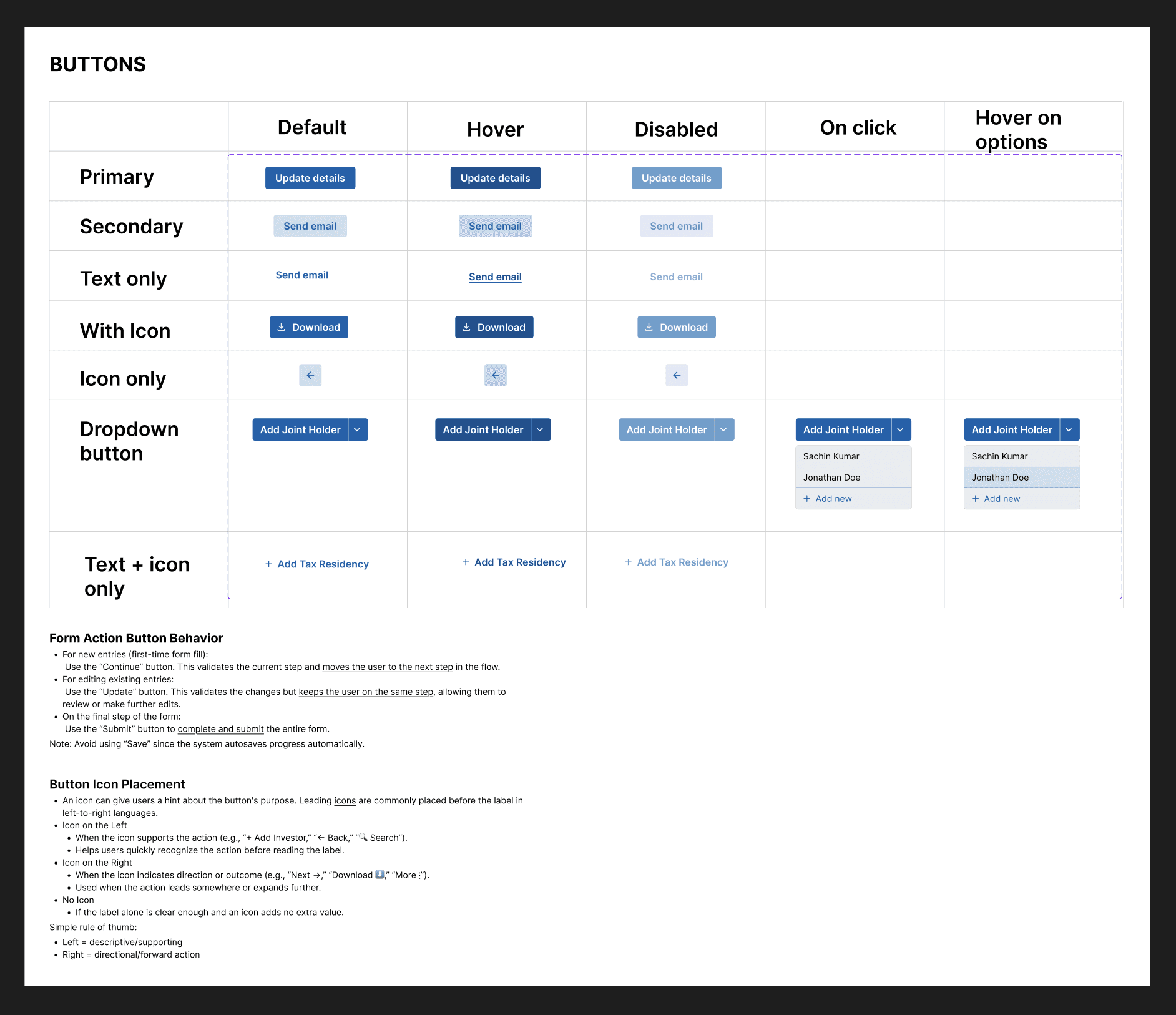
Button System
I designed button specifications covering all variants: primary, secondary, tertiary, and icon-only buttons. For each, I defined exact dimensions, padding, border radius, background colors, hover states, and text properties. I established which icons to use for common actions (add, edit, delete, view, download) and their placement relative to text. This removed ambiguity about which button style to use when.
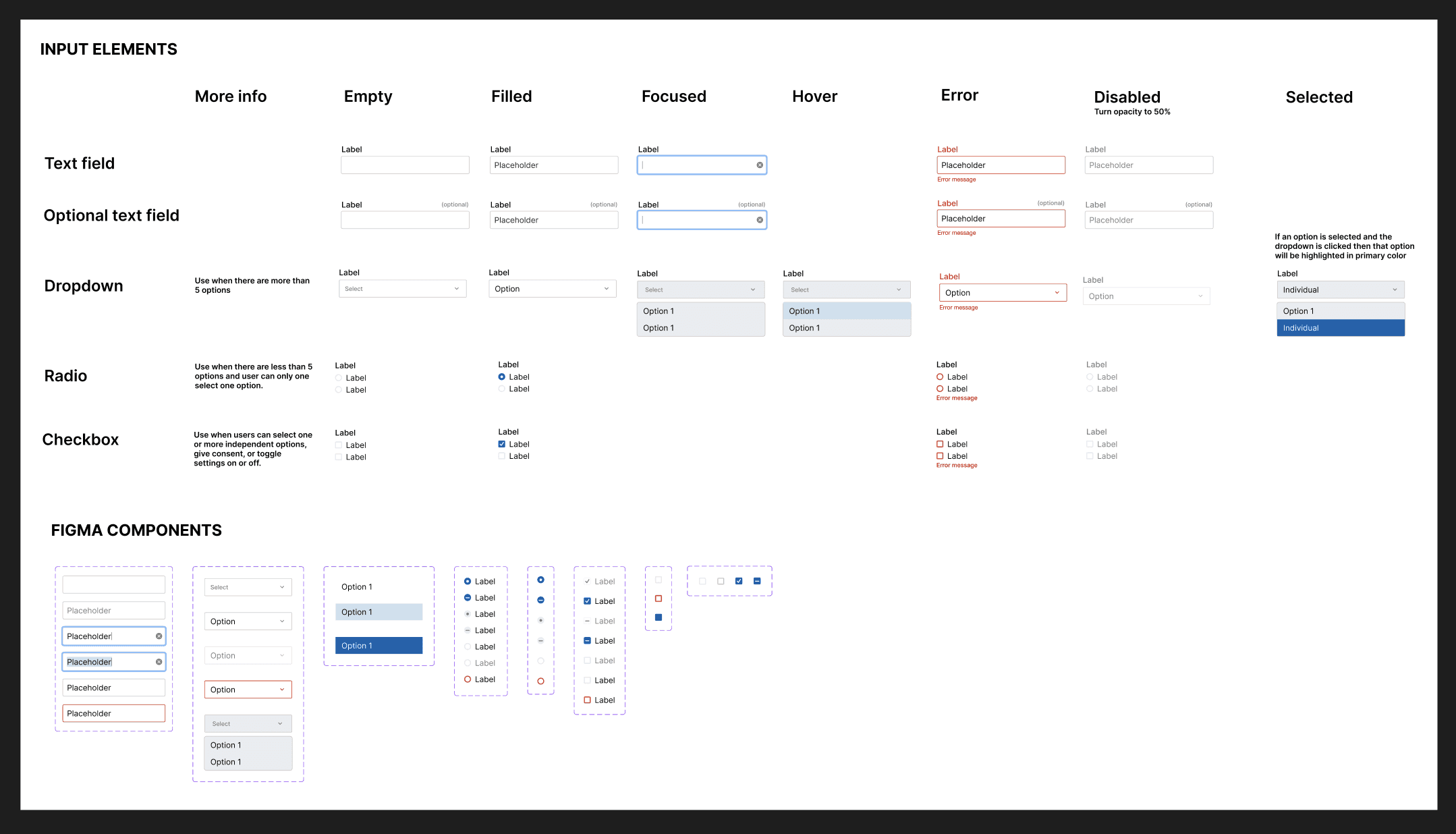
Form Elements
I created consistent designs for all input types: text fields, dropdowns, checkboxes, radio buttons, and date pickers. Each element had specifications for default, focused, filled, and error states. I also defined label positioning, spacing from fields, and validation message styling. Forms appeared on almost every screen, so getting this right was critical.
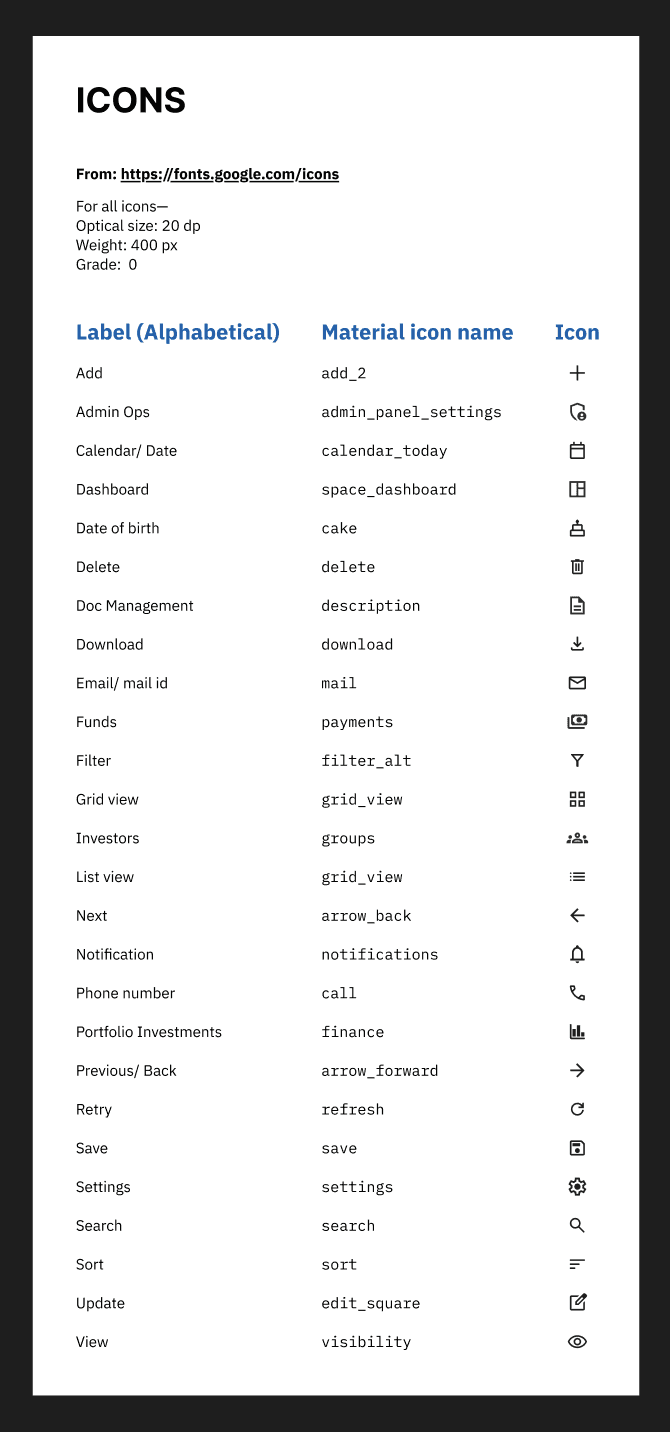
Icon Library
I selected and standardized icons for all navigation nodes and common actions. Consistency in icon style and size was critical for creating a cohesive experience across the platform. Users shouldn't have to relearn what icons mean on different screens.
These foundational elements became the building blocks for everything that followed. With these established, I could design complex screens confidently, knowing components would be reusable and consistent. More importantly, developers could implement features without design bottlenecks.
Design decisions & Iterations
Research-driven solutions that evolved through collaboration
With foundations in place, I tackled the admin portal's 12 main pages. Each presented unique design challenges that required research into best practices and iterative refinement as requirements became clearer.
Sidebar Navigation Placement
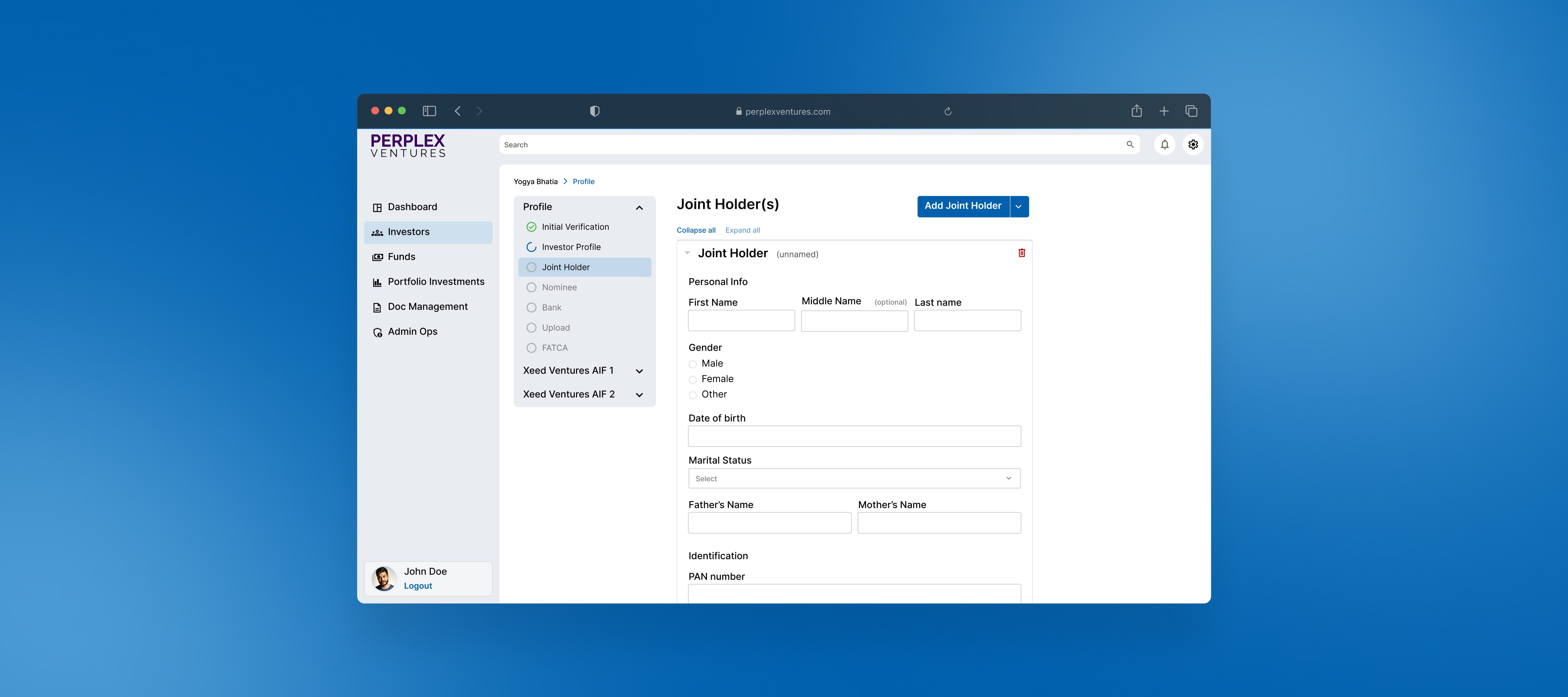
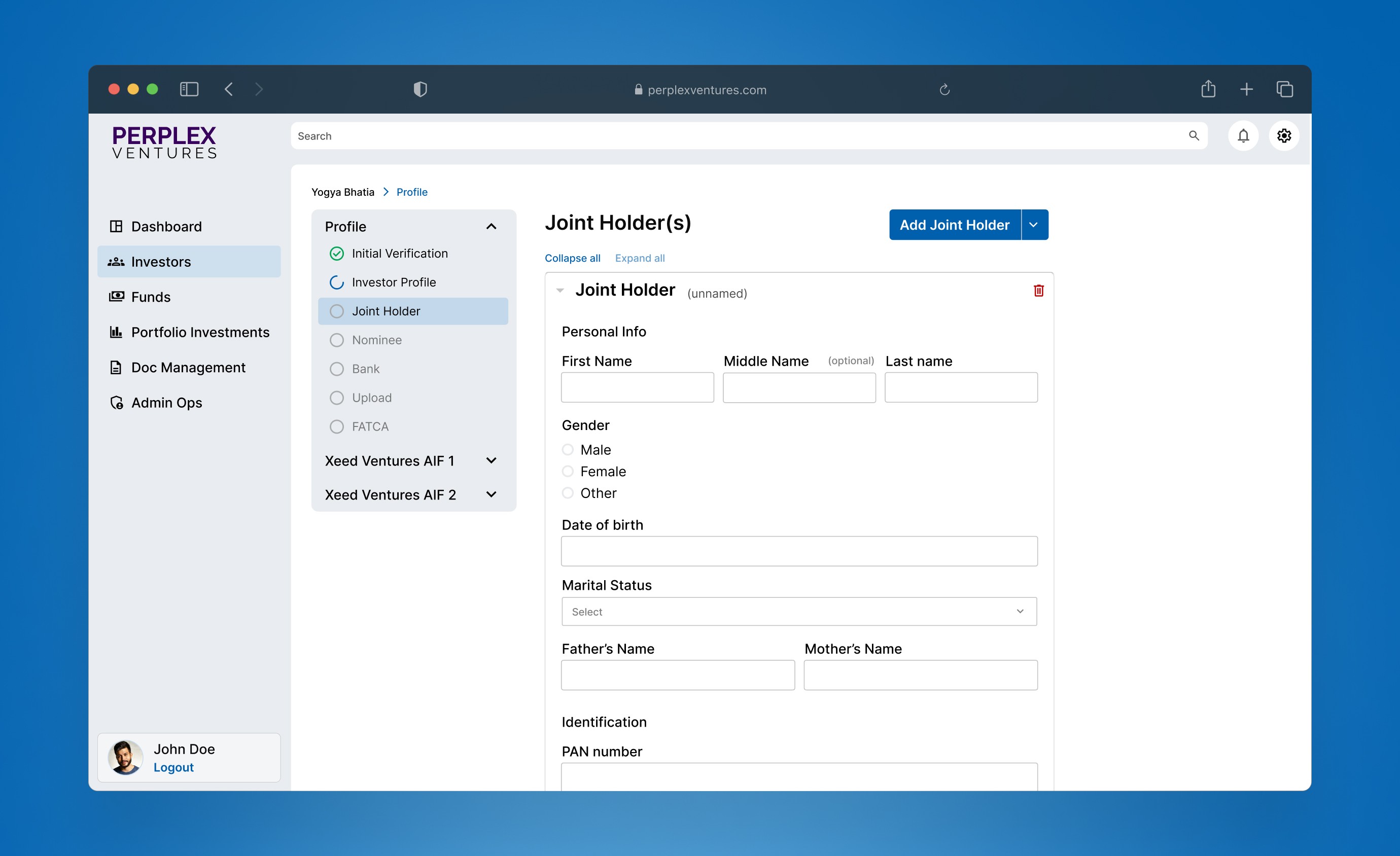
The challenge: Fund managers needed quick access to 6 major sections (Dashboard, Investors, Funds, Portfolio Investments, Document Management, Admin Ops) plus utility functions (search, notifications, profile), but screen real estate was limited. How could I make navigation efficient without cluttering the interface?
I researched navigation patterns for power users and learned they value speed over discoverability—they will memorize locations if consistent.
Based on this research, I chose a left sidebar for main navigation with utility items in the top-right corner. This pattern maximized efficiency for frequent navigation while keeping utility functions consistently accessible.
Multi-Step Forms and Progressive Disclosure
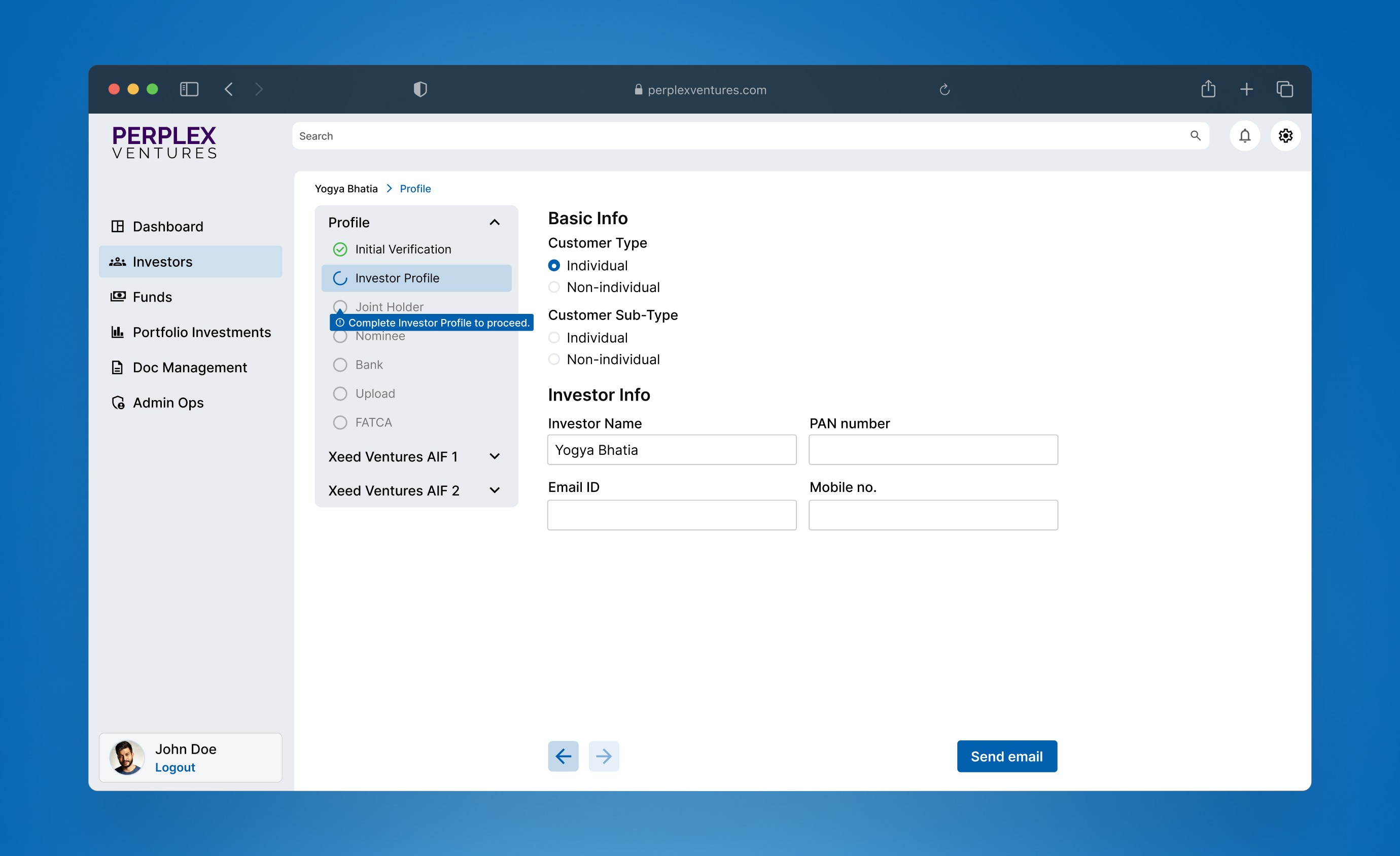
The challenge: Investor onboarding required collecting extensive information (personal details, financial status, documentation, joint holders) without overwhelming users during a high-stakes financial decision. How could we gather everything needed while keeping each step manageable?
I researched form best practices and learned critical constraints: 600px maximum width prevents eye strain from long horizontal eye movement, and no more than two fields per row avoids cognitive overload.
I also studied how financial institutions handle multi-step processes. So, I designed forms with a progress stepper showing all steps upfront, with each step focusing on one logical information group. This progressive disclosure made complex decisions less overwhelming.
Joint Holder Selection Evolution
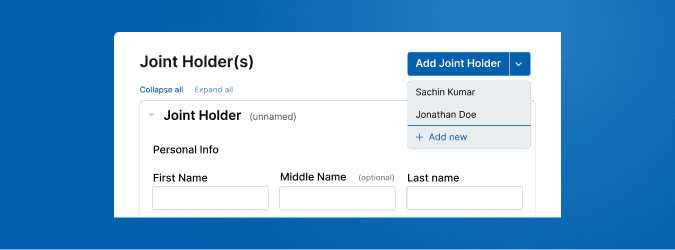
As requirements evolved, the team realized users should be able to select from people already added in earlier form steps, not just add new joint holders every time. This was a perfect example of requirements clarifying through discussion.
Initially a simple "Add Joint Holder" button, I redesigned it as a split dropdown that let users select from previously added people or add new ones— reducing redundant data entry.
Document Template Management
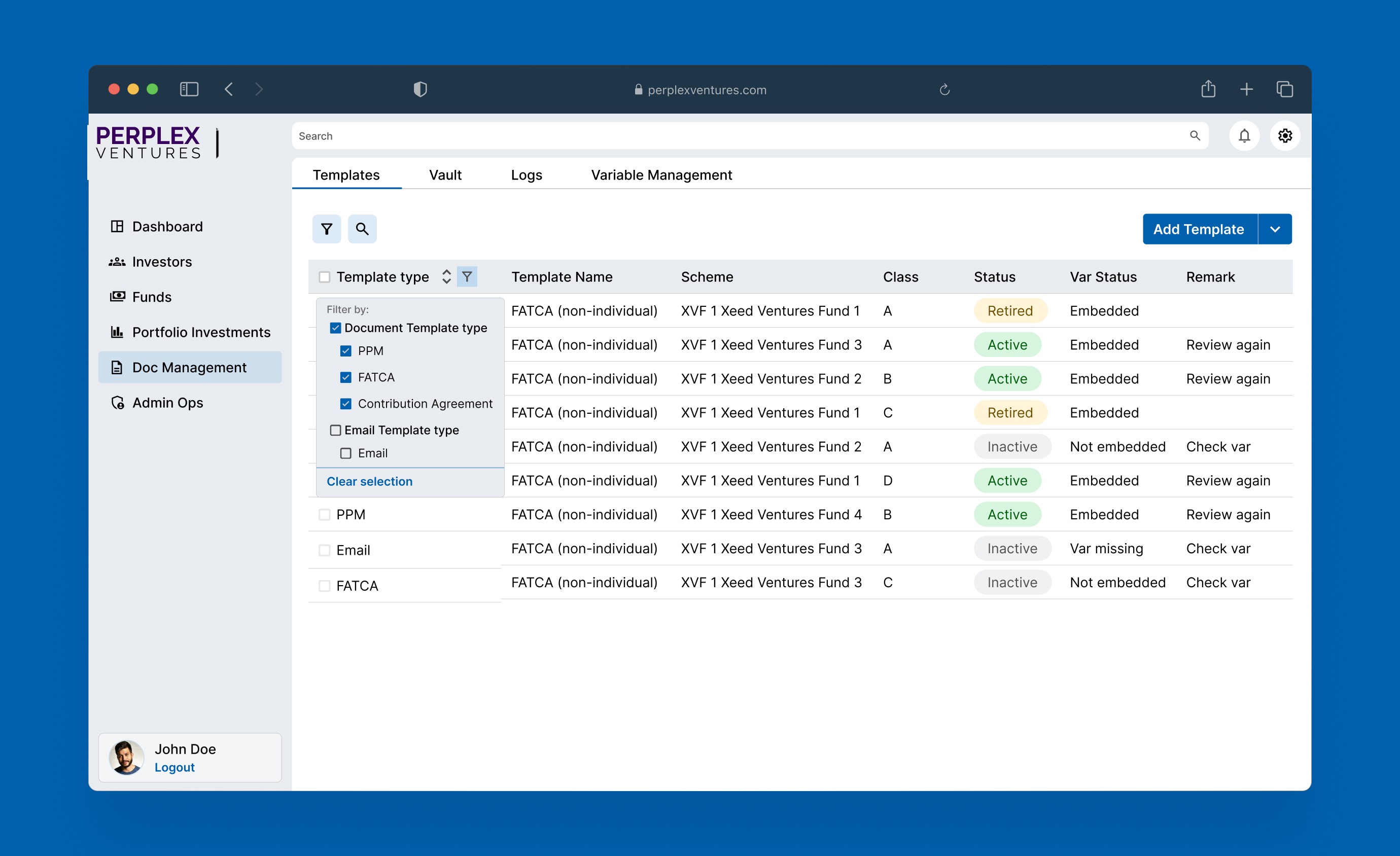
The challenge: This was one of the most complex pages. Users needed to manage document templates, preview PDFs, and edit variables, all while understanding the system's limitations based on template type.
I created a Data Table component for this page, with options to have global and column-wise filter and sort. This also needed research on best practices for complex tables.
Variable Editor
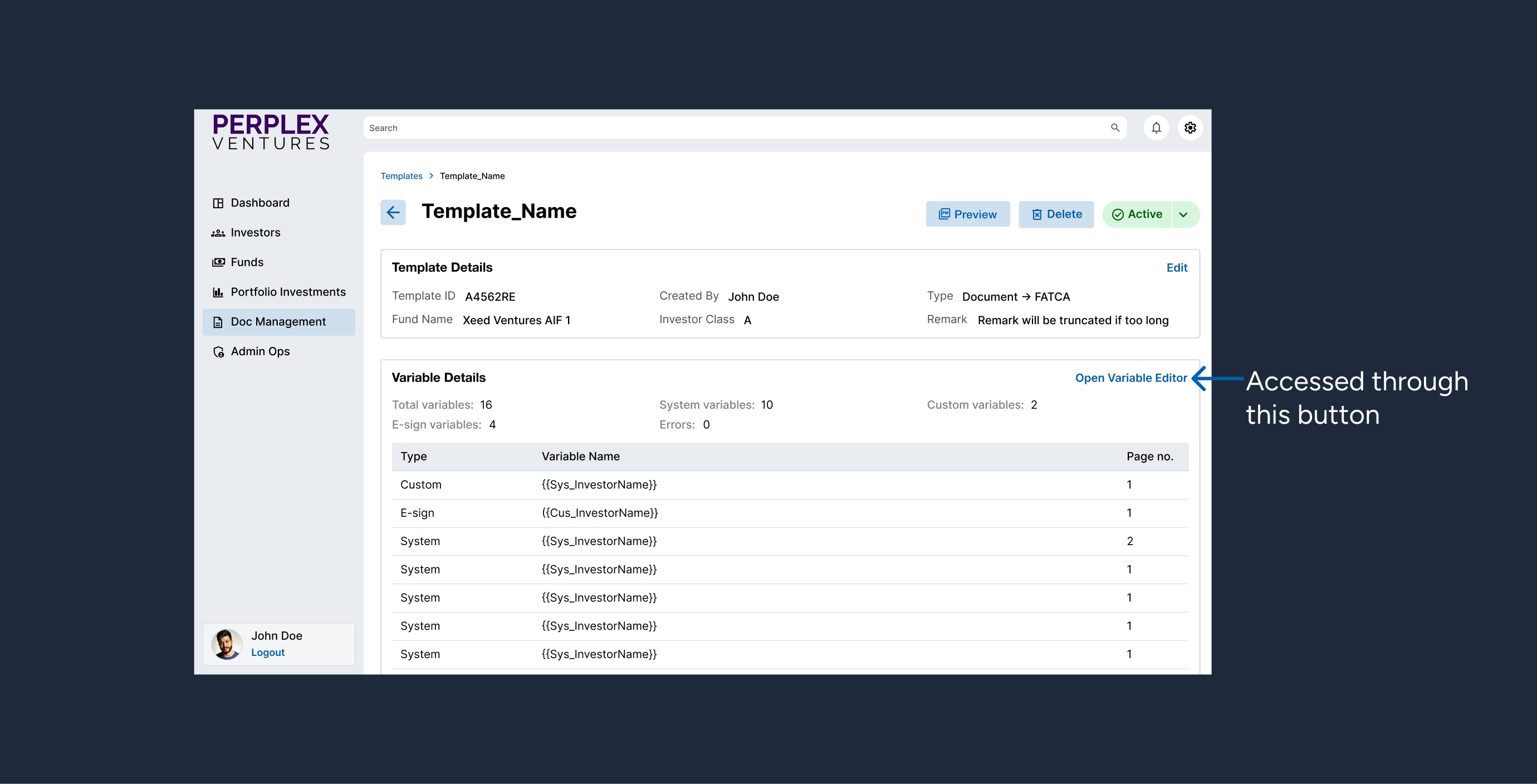
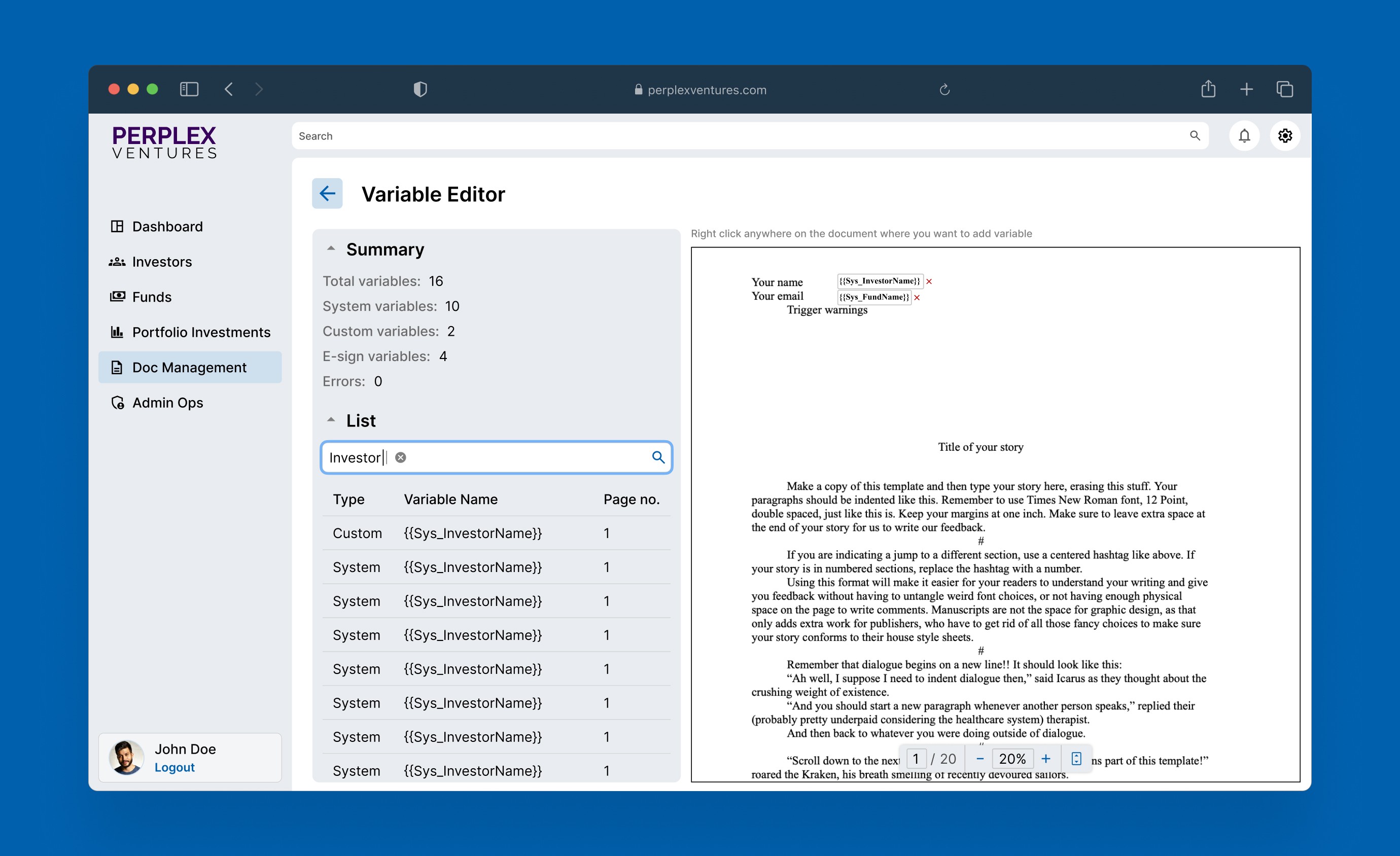
The variable editor was particularly challenging because it needed to handle three different template states: Non-embedded, Pre-embedded, and Extracted. I initially designed it assuming users could edit all variables in a template. Later I learned variables embedded during PDF upload couldn't be edited—only their metadata could be corrected.
This required significant UI changes to distinguish between embedded variables (view/correct only) and new variables (full editing). I added visual indicators and disabled editing states for embedded variables to prevent confusion about what actions were possible. This iteration taught me the importance of understanding system constraints before designing—asking "what can't users do?" is as important as "what can they do?"
Results & Impact
Delivered comprehensive design system for a complex financial platform
Over 3 months, I turned a fragmented interface into a cohesive, scalable platform.
What I Delivered
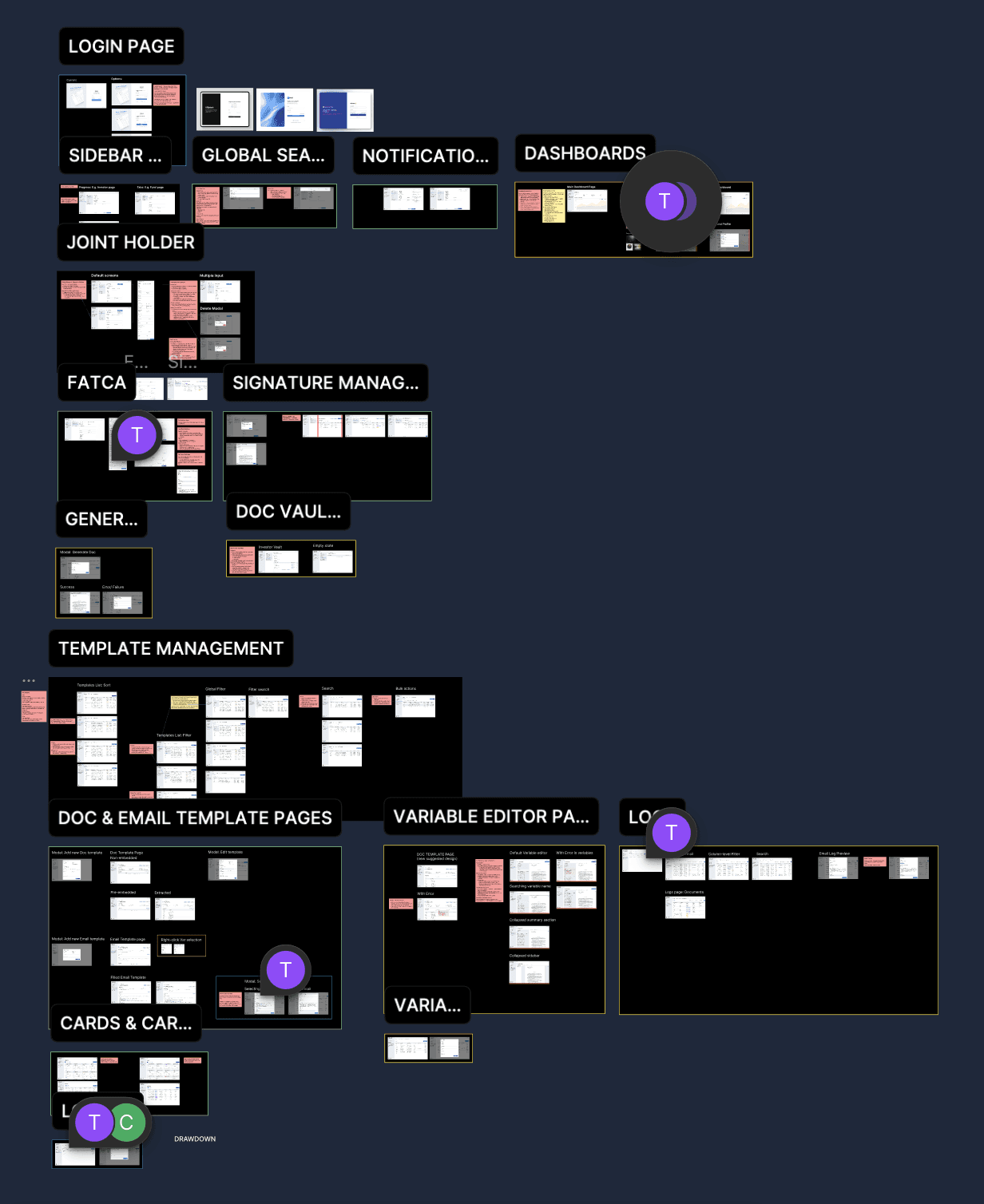
50+ screens designed including modals, multi-step forms, and state variations
Comprehensive design system with 25+ reusable components
12 admin portal pages and 5 investor portal tabs covering fund management, investor onboarding, document management, and operations
Complete specifications for developers including interaction states and usage guidelines
System Validation
By month two, the design system's value became clear. When tasked with designing the investor portal, I completed it significantly faster than the admin portal—the component library contained everything needed. New features could be assembled from existing components while maintaining complete consistency.
Team Impact
Developers reduced design questions significantly because the system became predictable. Product discussions shifted from "how does this work?" to "what problem does this solve?" Stakeholder feedback highlighted dramatic improvements in the interface's perceived reliability and professionalism—the platform was ready to represent the business to pilot users.
Reflection & Learning
What I learnt through designing under constraints
Systematic thinking substitutes for user research but can't replace it
Working without user testing forced me to rely on heuristic analysis and established principles. I learned that systematic methodology can guide sound decisions even without direct user feedback. However, my biggest question remains: Did my designs actually serve users well? Stakeholder feedback was positive, but I'm curious how real fund managers would interact with the interface and where they might encounter friction.
Design systems are about predictability, not just aesthetics
Stakeholders didn't comment on visual consistency but they noticed that interactions worked predictably. Users don't consciously appreciate matching buttons; they appreciate knowing what will happen when they click. This shifted how I approach design: behavioral consistency first, aesthetics as support.
Research Accelerates Decision-Making
Early on, researching form patterns or navigation structures felt time-consuming. But each research session created frameworks I used repeatedly. When new features arose, I could make decisions confidently because I'd already explored the problem space. Upfront research is an investment that pays dividends throughout a project.
What I Would Do Differently
I would push harder for user research with actual fund managers and investors earlier in the process. My systematic approach was based on solid UX principles and financial interface best practices, but direct user testing would have validated decisions faster and potentially revealed insights I couldn't anticipate through heuristic analysis alone.
The lack of user research remains my biggest question mark: Did my design decisions actually serve users well? Stakeholder feedback was positive, but I'm curious how real users with domain expertise would interact with the interface and where they might still encounter friction.
This project taught me that good design makes complex processes feel predictable and trustworthy. Every design decision is an opportunity to build or undermine user confidence, and systematic thinking is the foundation of creating reliable user experiences.